

كارت ادوات المتابعة الاجتماعية
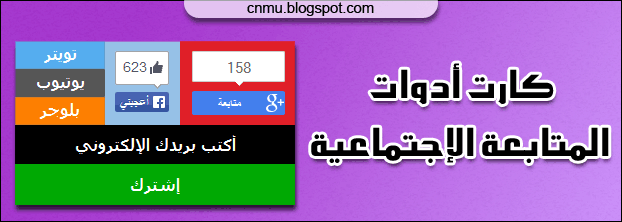
أقدم لكم إضافة جديدة وحصرية لأزرار وادوات المتابعة الإجتماعية خفيفة وبسيطة وفي نفس الوقت تجمل غالبية المواقع الإجتماعية المعتمد عليها من قبل المدونين في بلوجر تم استخدام ادوات رسمية لموقعي جوجل بلس Google Plus وفيس بوك Facebook كونهم ازرار خفيفة وسريعة التحميل لتويتر Twitter ويوتيوب Youtube وبلوجر Blogger
وهذا هو الكود أضفه في آداة HTML/JavaScript
<style>
#sosialandmail {
box-shadow: 4px 4px 2px #444;
width: 280px;
}
#sosialcnmes,.mailfcm {width: 100%;}
.gpluscm {
background-color: #e01f28;
display: block;
float: right;
height: 64px;
overflow: hidden;
padding: 10px;
width: 95px;
}
.fbcm {
background-color: #96c1e7;
float: right;
height: 64px;
overflow: hidden;
padding: 10px;
width: 55px;
}
.ytweet {
float: right;
width: 90px;
}
.twittercm, .ytcm, .bfolcm {
box-shadow: 0 0 1px #777 inset;
display: block;
float: right;
color:#fff;
font: bold 16px tahoma;
overflow: hidden;
padding: 3px 0 6px;
text-align: center;
text-decoration: none;
transition: all 0.7s ease 0s;
width: 100%;
}
.twittercm {background-color:#55ACEE;}
.ytcm {background-color:#555;}
.bfolcm {background-color:#FD7E00;}
.twittercm:hover,.ytcm:hover,.bfolcm:hover {background-color:#000; color:#fff;}
#cmfotext {
background-color: #000;
border: 0 none;
color: #fff;
display: block;
float: right;
font: bold 16px tahoma;
padding: 10px 0;
text-align: center;
width: 100%;
}
#cmfobu {
background-color: #00A903;
border: 0 none;
color: #fff;
cursor: pointer;
font: bold 16px tahoma;
padding: 10px 0;
transition: all 0.7s ease 0s;
width: 100%;
}
#cmfobu:hover{background-color: #1A4D17;}
</style>
<div id='sosialandmail'>
<div id="sosialcnmes">
<!---جوجل بلس--->
<div class="gpluscm">
<script src="https://apis.google.com/js/platform.js" async defer></script>
<div class="g-follow" data-annotation="vertical-bubble" data-height="24" data-href="//plus.google.com/u/0/GPID" data-rel="publisher"></div>
</div>
<!---فيس بوك--->
<div class="fbcm">
<iframe src="//www.facebook.com/plugins/like.php?href=https%3A%2F%2Fwww.facebook.com%2FPageID&width=55&layout=box_count&action=like&show_faces=true&share=false&height=65&appId=185398838186125" scrolling="no" frameborder="0" style="border:none; overflow:hidden; width:55px; height:65px;" allowTransparency="true"></iframe>
</div>
<div class="ytweet">
<!---تويتر--->
<a class="twittercm" href='https://twitter.com/TwID' target="_blank" rel="nofollow">تويتر</a>
<!---يوتيوب--->
<a class="ytcm" href='https://www.youtube.com/user/YTID' target="_blank" rel="nofollow">يوتيوب</a>
<!---بلوجر--->
<a class="bfolcm" href='http://www.blogger.com/follow-blog.g?blogID=xxxxxxxxxx' target="_blank" rel="nofollow">بلوجر</a>
</div>
</div>
<div class='mailfcm'>
<form id='cmforb' action="http://feedburner.google.com/fb/a/mailverify" method="post" target="popupwindow" onsubmit="window.open('http://feedburner.google.com/fb/a/mailverify?uri=FeedId', 'popupwindow', 'scrollbars=yes,width=550,height=520');return true">
<input id='cmfotext' type="text" value="أكتب بريدك الإلكتروني" onfocus="if (this.value == "أكتب بريدك الإلكتروني") {this.value = "";}" onblur="if (this.value == "") {this.value = "أكتب بريدك الإلكتروني";}" name="email"/>
<input id='cmfobu' type="submit" value="إشترك" />
<input name="uri" type="hidden" value="FeedId"/>
<input name="loc" type="hidden" value="en_US"/>
</form>
</div>
</div>
الإعدادات
استبدل GPID بمعرف صفحة جوجل بلسللحصول عليه ادخل الى صفحة مدونتك في جوجل بلس وانسخ الرقم او الغسم التعريفي منها مثال
.gif)
استبدل PageID بإسم رابط صفحتك على فيس بوك
استبدل TwID بإسم حسابك في تويتر
استبدل YTID بإسم رابط قناتك على اليوتيوب
استبدل xxxxxxxxxx بمعرف مدونتك
انتهى
منقول الفائده للجميع
إرسال تعليق